June 10, 2026
Solving the exploding bowtie problem
Most bowtie software replicates the original Shell diagram from the 90's pioneered by tools like Thesis and BowTieXP
It's a testament to the bowtie that it has remained pretty much the same since then, but it's not perfect. One of the main downsides that bowtie practitioners often encounter, is that the bowtie increases in size very quickly once you start adding escalation factors (we call them degradation factors) and escalation factor barriers (we call them barrier components).
This was one of the issues we wanted to solve in Riskrunner, and in version 1.12, we're excited to show you how we've solved the exploding bowtie problem by changing the layout of the bowtie diagram from this:
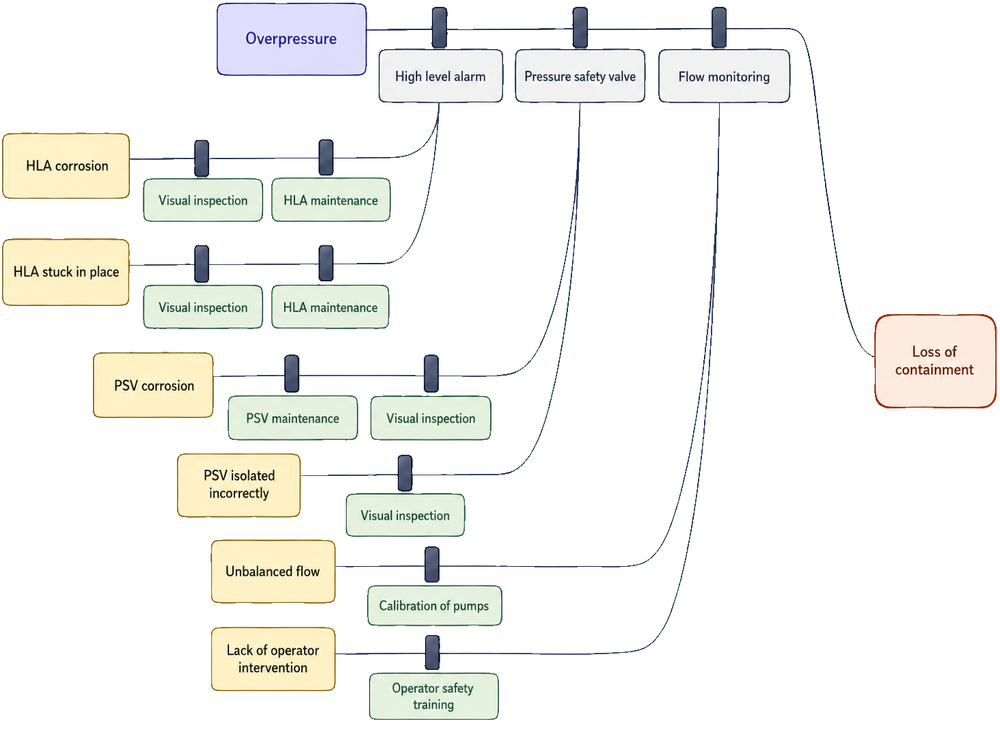
To this:
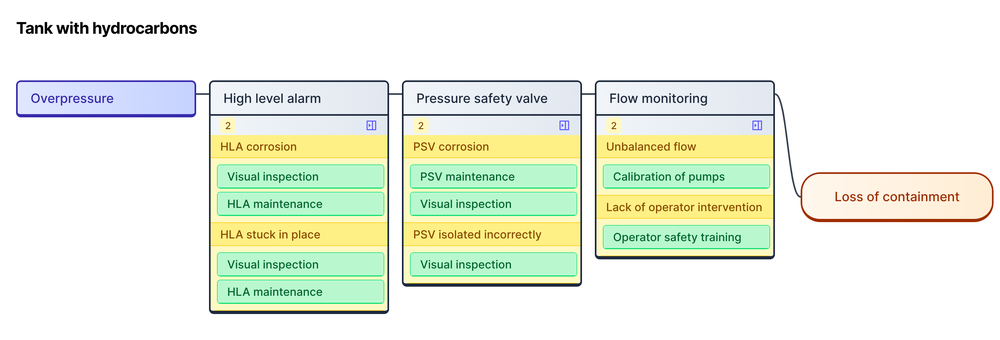
The change is simple yet effective. Instead of giving each degradation factor its own line, which quickly adds to the vertical size, we're stacking the barrier analysis trees side by side (barrier analysis is what we call the collection of degradation factors and barrier components underneath a barrier). Depending on how much you use degradation factors and barrier components, this reduces the size of the bowtie a lot.
The compromise is that we're only showing the first two levels of the barrier analysis in the bowtie itself. Deeper nesting is possible but we felt viewing those deeply nested structures in the bowtie didn't make sense, so those can be opened in their own window for an indivdual barrier.
Overall, we feel this is an important change to make the bowties a more powerful visual communication tool. Let us know what you think!